@monerica
look, if everything could be run locally then it would be. But who is taking the time to actually explain how to do that without spending a ton of money? You detail how to run an AI as good as the big ones locally then it will be considered.
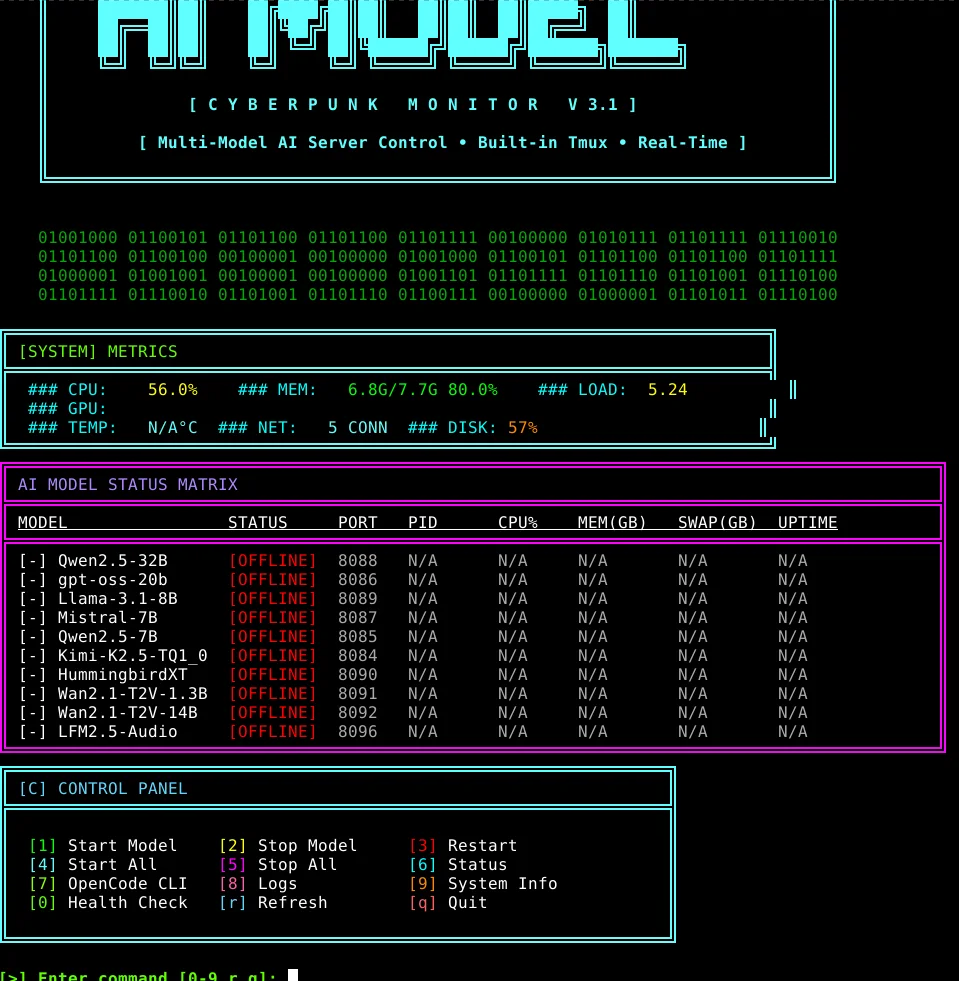
that was few months ago, they were all working locally (well, Kimi K2.5 needed over 200GB of VRAM, only had 128GB of share RAM/VRAM so with the SWAP on NVME drive that would have taken actually literally forever for even just a 1 character prompt lol, but when they releasing a rig like that in the future with more RAM (low powered, integrated graphics) then it's all setup to run it locally already :3
started the scripts with BigPickle (free in opencode, no API no nothing required):
curl -fsSL https://opencode.ai/install | bash
like, it was actually able to build the whole custom server from scratch instead of using ollama, it made scripts to convert properly the files to gguf and everything
then for couple weeks, the opencode team had Kimi K2.5 integrated for free, they ran it on their own infrastructure for test purposes and compare how it would perform with BigPickle i guess but sadly they ended up removing it (which is still just way better than BigPickle ngl)
still, they're both alright for basic tasks
the one that just ended up working the best in my case was gpt-oss-20b, didnt use much RAM, was good enough on small tasks, like, it made me a shell scripts to check on xmrchat.com tips and donation messages from the shell directly for example
but yea, for bigger projects, BigPickle should be enough, else Kimi K2.5 just next level
right now, for the V0.1-NoJS tower defense game thing, i had it made with BigPickle, it was able to implement the cryptography aspect very quickly
but now, since moved to doing a whole webgl 3d thing, Kimi K2.5 is pretty awesome on that, it can also procedurally generate 3d assets (like trees, basic characters) by using script shells through blender
so... got my xmr subscription for few days now at nano-gpt.com for their paid Kimi K2.5 instance lol
but i also got Kimi K2 Instruct (free) from the Nvidia API key
which is alright too but that latter one is super buggy from Nvidia's API being broken or somethin, it often has issues to write tools and so on, so...
well... even for the nano-gpt Kimi K2.5 instance as well sadly... which is a paid subscription....
but when opencode had it for free up for couple weeks on their infrastructure didnt have those issues... it was free... nano-gpt not, that's sad lol
so, always have to start sessions with:
read "file_writing_guide.md" at the root of current work directory, aknowledge it, then proceed with this and that task
$ cat file_writing_guide.md
Guide: Writing Large Files with Proper Tool Usage
The Problem
When writing large files (>200 lines), token limits can cause issues. The solution is to chunk the output into smaller operations.
Correct Approach
Step 1: Create Initial File with write tool
Use the write tool to create the first chunk (typically header + first major section):
{
  "filePath": "/path/to/file.md",
  "content": "# Header\n\n## Section 1\n...content here..."
}
Step 2: Append Content with edit tool
Use the edit tool to add subsequent sections. The key is using a unique oldString that matches the end of existing content:
{
  "filePath": "/path/to/file.md",
  "oldString": "...last line of existing content",
  "newString": "...last line of existing content\n\n## New Section\n...new content..."
}
Important: The oldString must exactly match existing content including whitespace.
Example from V0.5 Audit Report
First Operation - Create File:
{
  "filePath": "/V0.5d/docs/audits/V0.5a-AUDIT_KimiK2.5-01.md",
  "content": "# COMPREHENSIVE AUDIT REPORT...\n\n## EXECUTIVE SUMMARY...\n\n## DETAILED AUDIT: V0.5a...\n### V0.5a Verdict: 🔴 **FAIL - NOT PRODUCTION READY**"
}
Second Operation - Append V0.5b:
{
  "filePath": "V0.5d/docs/audits/V0.5a-AUDIT_KimiK2.5-01.md",
  "oldString": "### V0.5a Verdict: 🔴 **FAIL - NOT PRODUCTION READY**\n- Animation system has fundamental bugs\n- State machine is fake (just if-else chains)\n- No proper animation completion handling (onFinished doesn't exist)\n- yOffset calculation mathematically wrong\n- No skeleton rebinding",
  "newString": "### V0.5a Verdict: 🔴 **FAIL - NOT PRODUCTION READY**\n...same content...\n\n---\n\n## DETAILED AUDIT: V0.5b\n...new V0.5b content..."
}
Continue for Each Section
Repeat the edit process for:
- V0.5c section
- Comparative Analysis
- Conclusion
- Recommendations
Key Tips
- Chunk size: Keep each write/edit under 200 lines when possible
- Unique oldString: Use section headers or verdict lines as anchors
- Exact matching:
oldString must match exactly (including newlines)
- Escaping: Escape special characters like
\n, ", \, etc.
- Verify: Check file exists and has expected content after each operation
Common Mistakes to Avoid
❌ DON'T: Try to write entire large file in one write operation (token limit)
❌ DON'T: Use replaceAll: true when appending (will replace all occurrences)
❌ DON'T: Use generic oldString like "---" (may match multiple places)
✅ DO: Use unique section headers or verdict blocks as oldString anchors
✅ DO: Verify file content after each chunk
✅ DO: Use read tool to check current file content if unsure
Troubleshooting
If edit fails with "oldString not found":
- Use
read tool to see actual file content
- Check for extra whitespace or special characters
- Copy exact string from
read output
If file gets corrupted:
- Start over with
write tool
- Or restore from backup
Tools Reference
write: Creates new file or overwrites existing (use for first chunk)edit: Replaces specific text in existing file (use for appending)read: Check file content when troubleshootingbash: Use cat or wc -l to verify file
This guide written after successfully creating V0.5-AUDIT_KimiK2.5-01.md (699 lines, 26KB)