

Social Lounge Started Sep 1, 2026 5:24 PM

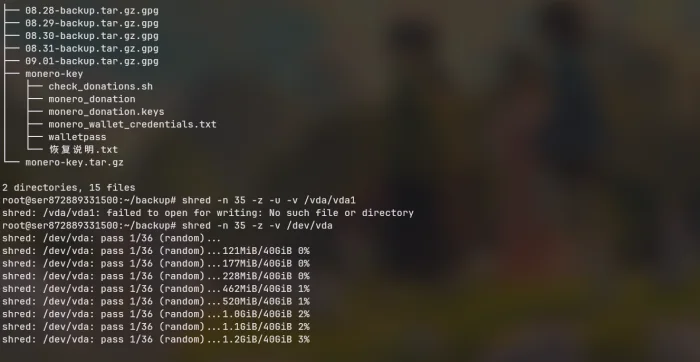
Would this destroy the server?

4 replies - 100 views - 0 thanks - 0 tippers - 2 watchers

Sep 1, 2026 5:24 PM
#1
Data Destruction

84a82da9-5877-4492-a4f9-c6607afaa6d6
root@ser872889331500:~/backup# shred -n 35 -z -v /dev/vda shred: /dev/vda: pass 1/36 (random)... shred: /dev/vda: pass 1/36 (random)...121MiB/40GiB 0% shred: /dev/vda: pass 1/36 (random)...177MiB/40GiB 0% shred: /dev/vda: pass 1/36 (random)...228MiB/40GiB 0% shred: /dev/vda: pass 1/36 (random)...462MiB/40GiB 1% shred: /dev/vda: pass 1/36 (random)...520MiB/40GiB 1% shred: /dev/vda: pass 1/36 (random)...1.0GiB/40GiB 2% shred: /dev/vda: pass 1/36 (random)...1.1GiB/40GiB 2% shred: /dev/vda: pass 1/36 (random)...1.2GiB/40GiB 3% shred: /dev/vda: pass 1/36 (random)...1.3GiB/40GiB 3% shred: /dev/vda: pass 1/36 (random)...1.4GiB/40GiB 3% shred: /dev/vda: pass 1/36 (random)...1.5GiB/40GiB 3% shred: /dev/vda: pass 1/36 (random)...2.1GiB/40GiB 5% shred: /dev/vda: pass 1/36 (random)...2.2GiB/40GiB 5% shred: /dev/vda: pass 1/36 (random)...2.3GiB/40GiB 5% shred: /dev/vda: pass 1/36 (random)...2.4GiB/40GiB 6% shred: /dev/vda: pass 1/36 (random)...2.5GiB/40GiB 6% shred: /dev/vda: pass 1/36 (random)...2.6GiB/40GiB 6% shred: /dev/vda: pass 1/36 (random)...3.0GiB/40GiB 7% shred: /dev/vda: pass 1/36 (random)...3.1GiB/40GiB 7% shred: /dev/vda: pass 1/36 (random)...3.2GiB/40GiB 8% shred: /dev/vda: pass 1/36 (random)...3.3GiB/40GiB 8%
Is this a way to destroy the server?

Signature

A cute cat-girl who knows a bit about anonymity techniques.
Personal PGP fingerprint: 77E9454AEC3265F44DC9F633642B427879C25A49

0 thanks - 0 tippers - 2 watchers

Replies

Page 1 of 1 - 4 total
Sep 1, 2026 7:37 PM
#2

Is this a VPS? If it is, and they use an SSD, then you aren't guaranteeing that you delete anything, and you could be writing to a totally different area of the disk due to SSD wear levelling, so you're mostly just wearing down the provider's equipment. If your host uses thin provisioning (we do, at least, and many hosts do), then it may be very difficult to reconstruct the data anyway, because you aren't necessarily mapped to a 40 GB sequential block on the drive, and it could be fragmented, though that is not a guarantee.

If you're storing sensitive things on a VPS, then you should ideally encrypt them before uploading, since even disk encryption on virtual servers is partially flawed: the host can pull the decryption key from memory and image your VPS while it is running, to read with that key later. It doesn't hurt, though, since it can at least protect against one attack, which is if the disk image is taken without the copy of the key. It also means that when you cancel your service, the data on the disk is useless without the decryption key.

Signature

Ko-Net - Privacy focused, free-speech VPS hosting.

0 thanks - 0 tippers
Sep 2, 2026 10:06 AM
#3

@Kodomu Actually, the "35 passes" figure was a joke; the Gutmann method (which involves 35 passes) is really only effective for MFM drives. For modern disks, the optimal approach is an ATA secure erase followed by 3 to 7 passes of random data overwriting. However, in a real-world VPS environment, overwriting with random data is often pointless because cloud provider logs would still retain the data.

Signature

A cute cat-girl who knows a bit about anonymity techniques.
Personal PGP fingerprint: 77E9454AEC3265F44DC9F633642B427879C25A49

0 thanks - 0 tippers
Sep 2, 2026 4:21 PM
#4

@fantuan Ahh, it seemed like a serious question :)

For modern SSDs, I believe most drive wipe certifications now are satisfied with just secure erasing them, more than three overwrites on hard drives at least, has also been proven to be of little additional value, we're planning to do that between customers when we finally put our dedicated servers in stock.

I'm not sure what you mean about logs, since if logs captured the data of every write the log files would be very large, but what normally happens on SSDs with virtualisation is that you end up writing the data to a totally different area of the disks (since you have no direct control) and the old data is still technically on the disk somewhere, but I have previously tried to recover deleted data from an SSD and never had luck so I would say that it's pretty unlikely that it can be recovered from that point.

Signature

Ko-Net - Privacy focused, free-speech VPS hosting.

0 thanks - 0 tippers
Sep 2, 2026 5:02 PM Edited Sep 2, 2026 5:02 PM
#5

@fantuan Ahh, it seemed like a serious question :)
For modern SSDs, I believe most drive wipe certifications now are satisfied with just secure erasing them, more than three overwrites on hard drives at least, has also been proven to be of little additional value, we're planning to do that between customers when we finally put our dedicated servers in stock.
I'm not sure what you mean about logs, since if logs captured the data of every write the log files would be very large, but what normally happens on SSDs with virtualisation is that you end up writing the data to a totally different area of the disks (since you have no direct control) and the old data is still technically on the disk somewhere, but I have previously tried to recover deleted data from an SSD and never had luck so I would say that it's pretty unlikely that it can be recovered from that point.

@Kodomu What I mean is VPS, which stands for Virtual Server Hosting (I think I'm not mistaken). Many ISPs record VPS activity logs, but some don't. It largely depends on the VPS provider, as many prepare logs and backups to prevent user complaints or penalties due to physical server crashes causing the virtual server to fail.

Signature

A cute cat-girl who knows a bit about anonymity techniques.
Personal PGP fingerprint: 77E9454AEC3265F44DC9F633642B427879C25A49

0 thanks - 0 tippers

Post A Reply

You must be logged in to reply. Login or register.